1. Attach your requirements
Choose your industry and assessment type on Evaluations. Upload up to three PDF or Excel (.xlsx or .xls) documents, up to 5 MB each. Available for every industry and sector.
Support documentation of service roads, facility boundaries and visible workplace conditions around rail properties.

Upload customer directions, guidelines, standards or contract requirements as PDF or Excel files. TruInspector Ai uses the relevant requirements alongside your photos and recorded videos to support a focused assessment.
Choose your industry and assessment type on Evaluations. Upload up to three PDF or Excel (.xlsx or .xls) documents, up to 5 MB each. Available for every industry and sector.
Identify the site, location and relevant area. Add photos or recorded video, select the assessment type, and attach your requirements for any specific priorities.
Relevant findings identify the customer document and available page, section or worksheet reference, explain the visible concern, and list corrective actions and missing field checks. Download the report as PDF or Excel.
Customer requirements are identified separately from official regulations. Confirm the applicable edition and scope; an upload does not establish legal applicability or certify compliance. Attachments stay within your signed-in workspace and are not included in public picture links.
Excel review uses up to the first 1,000 rows per worksheet and may summarize the content; embedded pictures and charts are not read. Export important diagrams and longer requirements sections as PDF. Use clear, unlocked documents and check source references in the report. Unreadable content, missing measurements, concealed conditions and requirements outside the evidence remain unverified. This is an assisted visual review, not a complete contract audit.
Each example includes a detailed preliminary observation, inspector checks, recommended work and closeout record. Use the arrow to hide or show the details.
The sample image suggests a connected pattern of cracking within the travel surface, with some broken edges and loose aggregate. The visible pattern can identify an area for review but does not show crack width, depth, movement, subsurface condition or the full affected area. A single image cannot establish the maintenance rating for an entire segment.
Mark and photograph the affected limits under the required traffic control. Have the pavement team determine whether sealing, localized patching or a more extensive repair fits the verified condition. Address drainage or failed material where field evidence supports it. Record the chosen treatment, quantities and responsible reviewer before scheduling work.
Photograph the repaired surface from matching viewpoints, record dimensions and materials, and have the responsible team verify the finished ride and surface continuity.
Applicable requirement: Field review required to confirm pavement condition and repair needs. An illustrative image does not establish a field measurement or compliance result.
The illustration suggests erosion and a low or irregular unpaved shoulder beside the pavement. Perspective alone cannot establish the drop-off height, slope, crossfall, material depth or distance along the road.
Protect the work area, shape the shoulder to the approved profile and replace unsuitable material where necessary. Compact and stabilize the repaired section using the controlling specification. Correct a verified drainage source so the same washout does not recur, and document the limits and materials used.
Recheck the profile and drainage, then record before-and-after photos and the field measurements.
Applicable requirement: Unpaved Shoulder. An illustrative image does not establish a field measurement or compliance result.

 Fence / gatesBent or damaged fence posts and gaps between gates.Read picture report
 The example depicts bent fence posts and a possible gap at a gate. The view identifies an apparent opening but cannot establish its measured width, whether the gate latches or the full extent of damaged fabric and posts.
Secure an opening that presents a verified access concern while the repair is planned. Replace or straighten damaged components as appropriate, restore tension and attachment of fabric, and adjust the gate so it closes and latches under normal operation. Use the approved fence and gate details for materials and dimensions.
Test the gate, document the repaired posts and continuous fence line, and record measured clearances and materials.
Applicable requirement: Fence; also checks torn fabric and missing posts. An illustrative image does not establish a field measurement or compliance result.
Vegetation and sediment appear to cover part of an inlet opening. The image shows the surface obstruction only; it does not reveal pipe condition, hydraulic capacity, buried blockage or the level of flooding during a storm.
Remove vegetation and debris from the grate and throat, dispose of material appropriately and restore the visible flow path. If flow remains restricted, arrange qualified inspection of connected drainage elements. Repair damaged grate or inlet components using the agency-approved detail, and address recurring sediment sources where confirmed.
Photograph the open inlet and downstream flow path, document removed material and any follow-up pipe or structure work.
Applicable requirement: Inlets or the actual drainage-asset characteristic. An illustrative image does not establish a field measurement or compliance result.
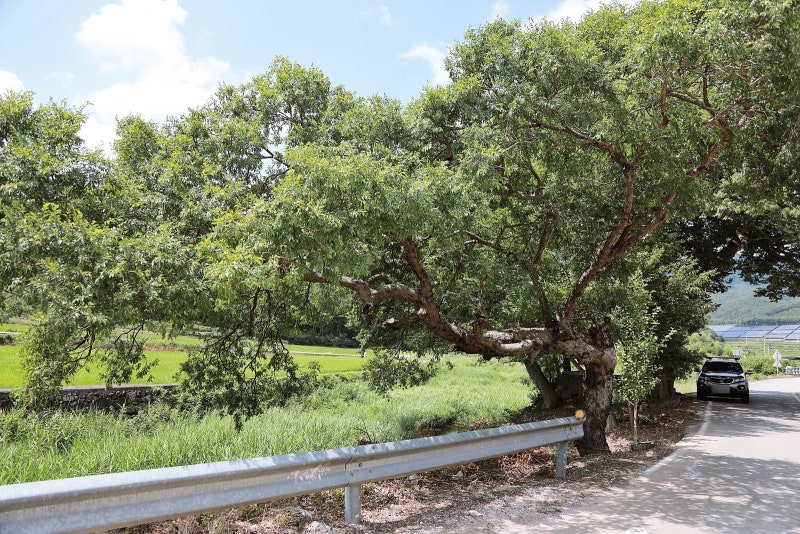 Tree trimming / vegetationTrees or limbs obscuring signs or encroaching on the roadway.Read picture report
 A tree limb appears to extend toward a sign or roadside asset in the illustration. The image cannot establish measured clearance, tree condition, right-of-way limits or safe pruning method.
Arrange qualified pruning within the verified work limits, protecting traffic and nearby utilities as required. Remove only the growth needed to restore the approved visibility or clearance while preserving tree health. Escalate instability or utility conflicts to the appropriate specialist rather than inferring them from a photo.
Photograph the cleared approach, record measured clearance and pruning limits, and schedule follow-up where regrowth is likely.
Applicable requirement: Tree Trimming. An illustrative image does not establish a field measurement or compliance result.
The image can show a missing cover, damaged pole or apparent fixture issue; daytime photographs cannot establish whether a luminaire operates at night. Electrical circuit condition is not visible.
Create a work order for confirmed outage or missing hardware, including fixture ID and evidence. Have an authorized electrical crew test and repair the correct component under approved safety procedures. Replace covers or hardware with compatible parts and check adjacent units if the fault appears shared.
Document the repair, tested operation and nighttime result with photos and service records.
Applicable requirement: Lighting; day checks cover poles, covers and hardware. An illustrative image does not establish a field measurement or compliance result.
All images and findings are illustrative. They show report structure and inspection topics, not actual field evidence or a compliance decision.
Select the state, industry, asset or safety topic and work type. Review matched references and field checks alongside the photo or sampled video frame.
Record supported access-road and fence conditions.
Keep photos and qualified reviewer notes with the field record.
Use workplace safety references appropriate to the employer and activity.
Rail operations and track safety can involve FRA rules and OSHA jurisdiction limits. TruInspector does not assess track geometry, signaling, railworthiness or operating clearance.
Source matches are preliminary. If a governing requirement is unavailable or outside the selected regulatory reference scope, the record remains unverified.
Discuss your requirementsTurn photos and recorded video into a reviewable condition record. Keep visible findings, evidence, recommended actions and follow-up together.
Share observations and supporting pictures in a report your team can review.
Keep category, condition, description and action notes organized. Include location and GPS when supported by the evidence.
Classify mixed photos, review separate asset reports and track work status in the Data Hub.