1. Attach your requirements
Choose your industry and assessment type on Evaluations. Upload up to three PDF or Excel (.xlsx or .xls) documents, up to 5 MB each. Available for every industry and sector.
Choose food manufacturing, retail food, drugs, medical devices or cosmetics to research the requirements relevant to the facility, product and selected state.
Upload customer directions, guidelines, standards or contract requirements as PDF or Excel files. TruInspector Ai uses the relevant requirements alongside your photos and recorded videos to support a focused assessment.
Choose your industry and assessment type on Evaluations. Upload up to three PDF or Excel (.xlsx or .xls) documents, up to 5 MB each. Available for every industry and sector.
Identify the site, location and relevant area. Add photos or recorded video, select the assessment type, and attach your requirements for any specific priorities.
Relevant findings identify the customer document and available page, section or worksheet reference, explain the visible concern, and list corrective actions and missing field checks. Download the report as PDF or Excel.
Customer requirements are identified separately from official regulations. Confirm the applicable edition and scope; an upload does not establish legal applicability or certify compliance. Attachments stay within your signed-in workspace and are not included in public picture links.
Excel review uses up to the first 1,000 rows per worksheet and may summarize the content; embedded pictures and charts are not read. Export important diagrams and longer requirements sections as PDF. Use clear, unlocked documents and check source references in the report. Unreadable content, missing measurements, concealed conditions and requirements outside the evidence remain unverified. This is an assisted visual review, not a complete contract audit.
These examples match this industry or specialty workflow. Each includes a detailed preliminary observation, inspector checks, recommended work and a closeout record. Use the arrow to hide or show the details.
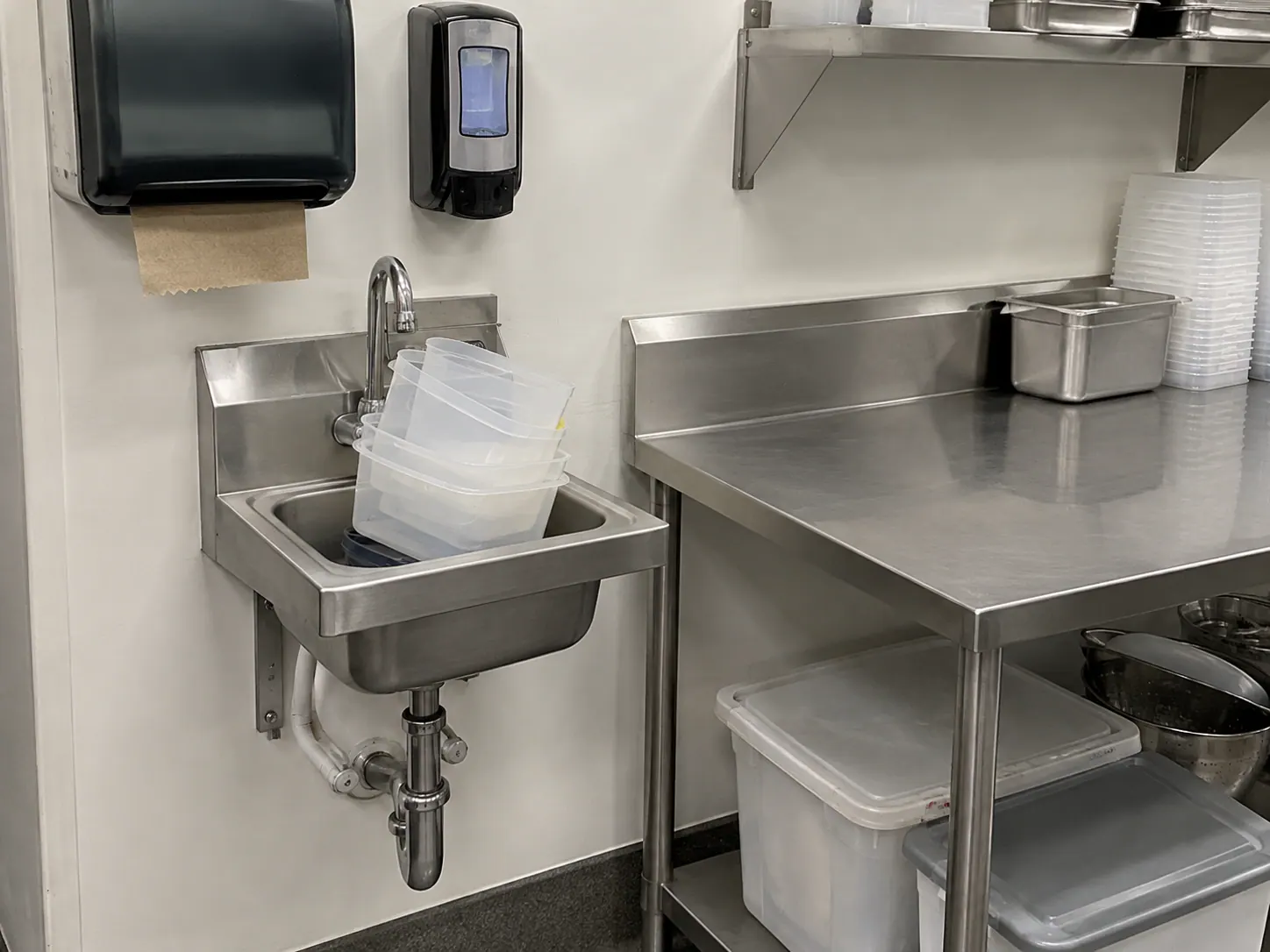
FDA / retail-food example — handwashing accessFood-storage tubs occupy the handwashing basin and obstruct its intended use.Read picture report The illustration shows plastic food-storage tubs stacked inside a small handwashing sink beside a preparation counter. The basin cannot readily be used for normal handwashing while the tubs remain there. Soap and towel dispensers are visible, but the photo cannot confirm supply, water temperature, flow, employee practices or contamination.
Move the tubs into appropriate clean storage so the sink can be used. Clean and restore the basin as required by the facility’s procedures, verify water and supplies, and review the storage practice with responsible staff. Add suitable storage capacity or identification if needed, without obstructing food-preparation or circulation areas. Do not infer product contamination or prescribe a recall from this image.
Photograph the restored sink, record operational checks and the applicable requirement, and document the responsible reviewer’s corrective-action follow-up.
Applicable requirement: Retail food generally uses state/local adopted food requirements. FDA’s Food Code is a model; food manufacturing has a different regulatory context. An illustrative image does not establish a field measurement or compliance result.
All images and findings are illustrative. They show report structure and inspection topics, not actual field evidence or a compliance decision.
Select the state, industry, asset or safety topic and work type. Review matched references and field checks alongside the photo or sampled video frame.
Identify the facility activity and product type before evaluation.
Review visible hygiene, storage, labeling and equipment concerns using the applicable sources.
Keep missing records, tests and jurisdiction checks explicit in the report.
Retail-food rules generally come from state/local adoption. Images cannot verify product safety, sterility, validation, registration or full regulatory compliance. TruInspector does not issue FDA approvals or official inspection findings.
Source matches are preliminary. If a governing requirement is unavailable or outside the selected regulatory reference scope, the record remains unverified.
Discuss your requirementsTurn photos and recorded video into a reviewable condition record. Keep visible findings, evidence, recommended actions and follow-up together.
Share observations and supporting pictures in a report your team can review.
Keep category, condition, description and action notes organized. Include location and GPS when supported by the evidence.
Classify mixed photos, review separate asset reports and track work status in the Data Hub.